


September 28, 2011
0
September 28, 2011
Admin
read more
Facebook F8: live stream from conference
Watch Facebook's F8 developer conference live as engineers and entrepreneurs collaborate on the future of social media technologies.
Watch live streaming video from f8live at livestream.com
f8 is Facebook’s Conference for developers, entrepreneurs and innovators building a more social web by defining tomorrow’s websites, apps and devices.This all day event with Facebook engineers and product teams will feature keynotes and session tracks that highlight our new tools along with best practices for developers and partners building the next generation of social experiences. We hope you'll join us! www.facebook.com/f8
0
Admin
read more
Facebook criticised for 'tracking' logged-out users
Facebook faces criticism over the way it continues to store and access information about users who have logged out of their account.
 |
| Facebook founder Mark Zuckerberg on stage at f8. The controversy was sparked by Nik Cubrilovic, an Australian technology entrepreneur, who found that even after he logged out of the social network, it delivered “cookies” to his web browser that could be used to track visits to other websites. Cookies are small text files used by websites to store user preferences and the contents of online shopping carts, among other functions. When users log out of websites cookies are often deleted, but Mr Cubrilovic found that Facebook only altered them, while continuing to store data such as his account ID.This unique identifier could be used to track logged-out users when they visit other websites that have integrated Facebook functions, such as the “Like” button, he said. “Logging out of Facebook only de-authorizes your browser from the web application, a number of cookies (including your account number) are still sent along to all requests to facebook.com,” Mr Cubrilovic said in a widely-shared blog posting. “The only solution is to delete every Facebook cookie in your browser, or to use a separate browser for Facebook interactions. "There is never a clean break between a logged in session and a logged out session." In response, Gregg Stefancik, a Facebook engineer, denied the cookies were designed to track logged-out users. “Our cookies aren’t used for tracking. They just aren’t,” he wrote. “Instead, we use our cookies to either provide custom content (e.g. your friend’s likes within a social plugin), help improve or maintain our service (e.g. measuring click-through rates to help optimize performance), or protect our users and our service (e.g. defending denial of service attacks or requiring a second authentication factor for a login from a suspicious location).” He also emphasised that Facebook does not share or sell the information it gathers about users, and said that the information the cookies report to Facebook when a logged-out user visits a third party site is not “personally identifiable”. But the explanation failed to placate Mr Cubrilovic, who also joined in criticism of Facebook’s new “frictionless sharing” features, announced last week, which shares details of what users are watching or reading automatically. “The privacy concern here is that because you no longer have to explicitly opt-in to share an item, you may accidentally share a page or an event that you did not intend others to see,” he said. |
September 27, 2011
0
September 27, 2011
Admin

read more
Hoax: FACEBOOK JUST RELEASED THEIR PRICE GRID FOR MEMBERSHIP.
Summary: Scammers have sent out a second version of an old Facebook hoax, trying to warn users that the company will soon start charging you to use the service. This time they even have fake prices!
Facebook users are warning each other that the social network will soon start charging its usersdue to the upcoming profile changes. Since this hoax spread so quickly and went viral, scammers are trying once again, this time with fake prices.
While these people likely have good intentions, the truth is that this is a hoax and Facebook will never ask you to pay to use its service. The “advice” comes in the form of one of the following messages:
FACEBOOK JUST RELEASED THEIR PRICE GRID FOR MEMBERSHIP. $9.99 PER MONTH FOR GOLD MEMBER SERVICES, $6.99 PER MONTH FOR SILVER MEMBER SERVICES, $3.99 PER MONTH FOR BRONZE MEMBER SERVICES, FREE IF YOU COPY AND PASTE THIS MESSAGE BEFORE MIDNIGHT TONIGHT. WHEN YOU SIGN ON TOMORROW MORNING YOU WILL BE PROMPTED FOR PAYMENT INFO…IT IS OFFICIAL IT WAS EVEN ON THE NEWS. FACEBOOK WILL START CHARGING DUE TO THE NEW PROFILE CHANGES
FACEBOOK SUPPOSELY JUST RELEASED THEIR PRICE GRID FOR MEMBERSHIP. $9.99 PER MONTH FOR GOLD MEMBER SERVICES, $6.99 PER MONTH FOR SILVER MEMBER SERVICES, $3.99 PER MONTH FOR BRONZE MEMBER SERVICES, FREE IF YOU COPY AND PASTE THIS MESSAGE BEFORE MIDNIGHT TONIGHT. WHEN YOU SIGN ON TOMORROW MORNING YOU WILL BE PROMPTED FOR PAYMENT INFO…IT IS OFFICIAL IT WAS EVEN ON THE NEWS. FACEBOOK WILL START CHARGING DUE TO THE NEW PROFILE CHANGES. IF YOU COPY THIS ON YOUR WALL YOUR ICON WILL TURN BLUE AND FACEBOOK WILL BE FREE FOR YOU. PLEASE PASS THIS MESSAGE ON IF NOT YOUR ACCOUNT WILL BE DELETED IF YOU DO NOT PAY..
This second hoax is also spreading like wildfire on Facebook. Many scams have claimed Facebook will ask you to pay in one form or another, but they’re all bogus. The company even tries to remind its users on the website’s main login page (if you’re logged in, you’ll have to log out to see it): “It’s free and always will be.”
The company even released a statement once it realized the hoaxes had gone viral. “A rumor on the internet caught our attention,” a Facebook spokesperson said in a statement. “We have no plans to charge for Facebook. It’s free and always will be.”
Facebook makes a lot of money from the ads viewed and clicked by its 800 million active users. In fact, the social networking giant is expected to make $4.27 billion in revenue this year, 89 percent of which will come from advertising.
As a general word of caution, don’t believe everything you read on the Internet. Also, don’t blindly copy and paste warnings just because your Facebook friend’s status tells you to do so. Although you probably mean well, you could be helping a hoax become more popular on the social network.
Via zdnet
September 26, 2011
0
September 26, 2011
Admin


read more
10 Best Games on Facebook to Engage and Play with Friends
Facebook can be many things: a town square to share news, a coffee shop to chat with your friends quietly … or an arcade where you can play most addictive Game titles today. For you we have compiled the most popular games on Facebook.
And you’ll agree that there are few applications / Games where you build cities, grow tomatoes or solve puzzles, are the order of the day. We are so sure you know how little one as it will cost you hook up the rest. Ready to put some games on your wall?
Social Sims
The Sims Facebook have reached a second time, but this time is to stay. After the fruitless and dull version of Social Sims, we finally have a faithful representation of the Sims on Facebook. In Social Sims, you can customize your character, decorate your home, level up, improve your skills and visit your friends.
What’s the main attraction? The relationships with your friends, who can become lovers, friends or enemies. Social Sims is probably the most complete game for Facebook to date.
Civ World
Civilization is one of the franchises most popular strategy games. It’s legacy comes to Facebook with this game, shortened version of his predecessors and focused on issues that force you to share resources and ask your friends. In Civ World, you have to build a city and ensure that your subjects are happy and productive. And then only, You will increase your wealth, expand your domain and other players to win battles in the form of role-playing games with cards. May not be as spectacular than the classic Civilization, but it is definitely fun.
Angry Birds
After sweeping the phones, computers and browsers than half the world, the most furious birds were released into the Google+ social network. Fortunately it is not the only place where you can enjoy this game: you can also do this from your Facebook profile. Surely this is not Angry Birds neither more nor less than the browser version as always, in the form of Facebook application. However, the fun and addiction of the game remain intact.
Farmville
Who does not know? A real boom that still has hooked more than 30 million people that break their backs every day to harvest. It has been criticized their lack of originality too similar to the previous Farm Town – but that has not stopped it the most successful social game to date. Take care of your farm, modify it as you like, help your friends and take care of livestock.
Café World
One of the many creations of Zynga, set this time in the creation and maintenance of a cafeteria. It started of as normal, serving coffee, but several million users later, the options multiply and overwhelm almost reaches the number of variables and dishes available. It is certainly an addictive game, but can become a burden almost greater than having a real coffee shop, having to keep track of when food will be ready to prevent “rot”.
Pet Society
Having a pet is a big responsibility, but do not worry whether your pet is virtual. In addition, some freedoms that will allow you to customize the look of your furry friend to your image and likeness, home furnishing and many more. Pet Society is an old glory of the Facebook games that, despite their lack of innovation, it remains among the most played and… Who does not like pets?
It Girl
It’s a game for the female audience in Facebook, which lets you go from store to store all afternoon (as long as your energy allows it) without the fatigue of walking or better yet, spend a single euro. You can not only shop and find the best bargains in the sales, you can also “battle-style” to prove you’re the most stylish, find yourself a boyfriend and at festivals. All this if you can stand the pink overdose.
City Ville
Concept which made ??famous Farmville, Zynga repeated success with the environment like urbanites: In this case you have to create the largest city in the world, making your citizens happy, spend their pay on your sweet shops , flowers and other supplies not suitable for diabetics. Farmville negative points apply here too: the graphics, but please, cluttering the view and the game gets repetitive over time. It also generates many reports that, eventually, could overwhelm your contacts.
Diamond Dash
Diamond Dash simplifies the approach to increase the addiction: just click on groups of three or more identical gems for points and beat your record or your friends. As you play games Diamond Dash, you will level up and getting new challenges and achievements. Competition is simple, fast and wild. Are your reflexes good enough?
Mafia Wars
We ended up with what was one of the first major games to Facebook: a ??simulator that transports you to the underworld, from the last steps to the higher echelons of organized crime. Currently, the game has been completely outdated: its static screens and continued expected to require any action and not to the liking of most users, but still has a legion of faithful followers who will do anything in search of respect, power and pelf.
What game would you add to the list?
To start playing, enter the name of game in Search bar of Facebook and Go to App!
0
Admin


read more
PTCL 3G EVO Tab: Price and Specifications
After the launch of Ufone Futura (which offered GSM voice and EVO Broadband), one such high-end device was very much expected. And here we have a mid-range touch screen, Android Froyo powered device at a price tag of Rs. 27,999 (three months of free unlimited internet included).
With EVO coverage in more than 100 cities, PTCL definitely had a chance to come up with a CDMA compatible smartphone or tablet. They can win handsome number of subscribers before 3G could practically hit the market in 2012 or beyond.
With this EVO tab, PTCL is now part of smartphone competition that was earlier geared by cellular companies only. Probably a good solution for those who require high speed internet while on the go.
Though PTCL isn’t disclosing the original manufacturer of this tablet; their helpline said they don’t have any words on the make or model – but we are pretty certain (thanks to a reader’s comment below) that it’s Indonesia made IVIO Twilight 7 device or it’s little variant maybe that is tailored specifically for PTCL.
Ivio is a brand owned by an Indonesian company PT. Intersys. They develop mobile devices like modems, handsets, and at least 1 Android tablet.
Following is the device image being displayed on IVIO official page, which looks pretty similar to PTCL’s EVO Tab.
It merits mentioning here that PTCL’s EVO Tab supports GSM network as well, meaning that, you can use cellular SIM for voice calls too. Having a bluetooth earphone will be added advantage – or you can use speakerphone for voice calls. P.S. We are not sure if PTCL allows you to use cellular SIM or not.
Specifications:
Size & Weight:
- Size: 199*114*12mm
- Weight: 429g
Display:
- 7” screen
- WVGA LCD 800X480 resolution
- Capacitive touch screen
- Multi-Touch
Memory:
- 512 MB (RAM) & 512 MB (ROM)
- Micro Slot up to 32 GB
Cellular & Wireless:
- Support EVDO/CDMA 1X 1900Mhz,
- GSM/GPRS/ EDGE/UMTS Quad-band: 850/900/1800/1900/ UMTS 2100Mhz
- Dual Mode: EVDO or UMTS
Processor:
- Qualcomm MSM7627T (Turbo) 800Mhz
Operating System:
- Android Froyo OS Smartphone 2.2
Sensors:
- G-Sensor
- Light Sensor
- Wi-Fi
- Bluetooth EDR 2.1
Camera
- 5 Megapixel rear Auto Focus,
- VGA Secondary front Camera
Input/output:
- USB Port
- Ear phone port
- TF card slot
- SD card Slots
Battery
- 3500 mAh internal Battery
- 7hours usage
- 140hours standby time
Price and EVO Tariff:
As a part of launch offering, PTCL is selling EVO Tab with 3, 6 or 12 month contract for EVO unlimited package at following rates:
- EVO Tab + 3 Months Unlimited EVO = Rs. 27,999
- EVO Tab + 6 Months Unlimited EVO = Rs. 29,999
- EVO Tab + 12 Months Unlimited EVO = Rs. 31,999
After the launch offer, usual 3G EVO pricing would be as following:
- Evo Tab Unlimited (Unlimited data volume): Rs. 2,000
- Evo Tab 5 GB (5GB Data Volume): Rs. 1,500
- Evo Tab 2 GB (2 GB Data Volume): Rs. 1,000
Via, Propakistani
September 24, 2011
0
September 24, 2011
Admin
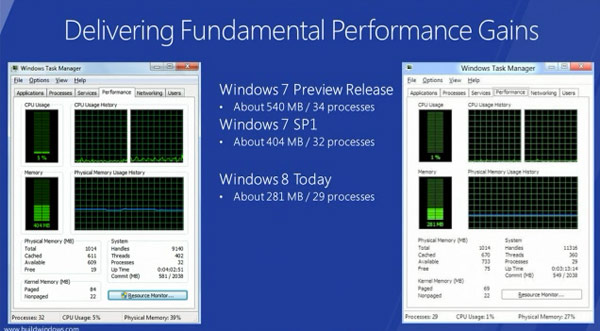
 Curious what the minimum specifications for Windows 8 will be? As are we. Microsoft's remaining mum on specifics, but the outfit's Steven Sinofsky -- President of Windows and Windows Live -- just confessed during the opening Build 2011 keynote that an antediluvian Lenovo S10 was potent enough to run Windows 8. And in fact, it'll do so with more poise than with Windows 7. A brief demonstration explained that Win8 demanded fewer system resources (barely, but still) than Win7 on the same hardware, proving that an early-gen Atom CPU and 1GB of RAM is "enough" to run the outfit's upcoming operating system. We highly doubt it's enjoyable, but at least you (probably) won't be forced into an upgrade if you don't want to be. Have a gander at the actual numbers just after the break!
read more
Windows 8 can run on an Atom CPU, 1GB of RAM
September 23, 2011
0
September 23, 2011
Admin


Adding 'life events' to your timeline.
read more
Get Facebook's New Timeline Right Now
Facebook CEO Mark Zuckerberg yesterday announced a complete reconceptualization of profile pages on the popular social network with the introduction of Timeline. As Zuckerberg puts it, Timeline is the story of your life.
Gone is the single column wall of posts with the most recent updates telling '15 minutes of your story.' Instead, as the name suggests, you'll see a timeline of life events containing photos and other updates that stretches back to when you joined Facebook. Anyone viewing it can click back to any year where there are updates and see what was going on.
Facebook automatically selects the most important updates and highlights them with a blue dot. Grey dots represent hidden updates that might not be as important. Users can arrange their Timeline however they see fit by removing certain updates or highlighting others that might be important to them. The feature will begin rolling out to the public over the next few weeks, but developers can sign up for early access now. Here's how you can get it too:
- Visit the Facebook Developer page and enable it for your account.
Click the 'Create New App' button on the top right. On the New App prompt window, give your app a display name and name space -- any name, it doesn't matter. Agree to the Platform Privacy Policy and click Continue. You will need a verified Facebook account so make sure you have either a credit card or phone number on file.
After clearing the CAPTCHA verification you will then be taken to your new apps' settings screen (if Facebook doesn’t put you there automatically hit the Edit App button on the top right). Next, click on Open Graph link in the left column and define an action for your new app on the right pane. You can enter whatever you like; I wrote watch on the first field and chose video from the drop-down menu on the next one. Click "Get Started."
That's it! You may see an error telling you that something went wrong but just ignore that and head to your Facebook homepage, you should see an invitation to the new Facebook Timeline Beta (you may have to wait a few minutes). Once you are in you can take a short tour of the new timeline view or start editing your profile until you are ready to publish it.
The timeline functionality isn't compatible with the "old" Facebook, so most of your friends won't see your fancy new page just yet. Users will be migrated over the coming weeks as Facebook rolls out the update to everyone.
The new Facebook site looks gorgeous, but going beyond pure aesthetics, how do you feel about Facebook's new approach to personal profiles, opening up more about your life to your social circle and potentially to the web?

The top portion of the timeline features a configurable background picture called the Cover,
and has personal information on the left along with your friends, photos, and Likes.
and has personal information on the left along with your friends, photos, and Likes.

0
Admin

read more
Timeline, Open Graphs introduced at Facebook f8 conference
Facebook CEO Mark Zuckerberg announced two key features for the social network at the annual f8 developer conferencein San Francisco, California. Timeline and an updated version of Open Graphs are expected to revolutionize Facebook moving forward and change the way we share things with friends.
The first is Timeline which was created to address a need to share older status updates and other important events in your life. Current status updates get “pushed off a cliff” and are lost forever once they leave your profile.
Zuckerberg said the original Facebook profile represented the first five minutes of your life if you were to introduce yourself to someone new and your stream consisted of the next 15 minutes in your story. Timeline is described as the next step in telling your personal life story.
With Timeline, your entire life story can be told on a single page, dating back as far as you would like. The page layout resembles a personal blog with a large cover photo at the top followed by important updates listed in reverse chronological order as you scroll down through the page. Facebook automatically selects the most important updates and highlights them with a blue dot. Grey dots represent hidden updates that might not be as important.
Users can arrange their Timeline however they see fit by removing certain updates or highlighting others that might be important to them. Various filters can be applied to Timeline such as photos or maps of where you have been. Timeline will be rolling out progressively over the next couple of months.
The next major feature is an update to Open Graphs which brings a new class of apps that encompass multiple features in an effort to better link friends. Open Graphs allow you to share things like music, movies and news using the new ticker on the right side of Facebook in real time in what the company calls real time serendipity.
As was speculated last month and leaked yesterday, one of these new Open Graph features involves music.
Facebook has teamed with more than a dozen streaming music providers such as Spotify, Rdio and Vevo to bring music listening and sharing to Facebook. You will be able to see what your friends are listening to in the ticker and furthermore, you can tune in live to listen to exactly what they are hearing.
But music isn’t the only service that is getting the Open Graph treatment. Netflix CEO Reed Hastings took the stage to announce that his company was just one of nearly two dozen video providers that were launching Facebook apps designed to share what users were watching with their friends. News outlets, game developers and lifestyle app creators are also joining the Open Graph network. Zuckerberg believes this will be the next big way to spread the word about varying types of media socially.
Media apps for Open Graph are launching right now while other apps such as lifestyle and games will slowly be released alongside Timeline.
September 21, 2011
0
September 21, 2011
Admin

 read more
New Facebook: 6 Things you Need to Know
Some freaky stuff happened over night to your Facebook profile, and you may be starting to twitch a little about this time.
So far, for each of the following Facebook changes announced on their blog, about 20, 000 people have posted responses complaining about the changes. That sounds like a lot until I tell you that 748,980,000 people didn’t complain. In other words, it’s this all over again.
So here’s your quick and easy guide so you can catch up with Facebook and get on with your day. Click “Click to Continue” to get updated in under 5 minutes…
1. Top Stories and Most Recent now in one News Feed
Facebook’s own blog summed up this change nicely: “When you visit Facebook, you should see the things you’re most interested in…” So they are trying to make sure you do by ditching the old Two-Option News Feed, which made you choose either Top Stories (popular stuff in order of popularity) or Most Recent (chronological order).

- That is SO yesterday…
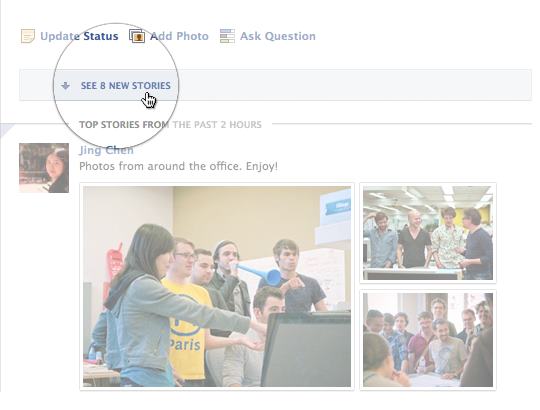
Replacing it is a single News Feed which shows you both with Top News show at the, you guessed it top, and Most Recent underneath. If you haven’t visited Facebook for a while, the first things you’ll see are top photos and statuses posted while you’ve been away. They’re marked with an easy-to-spot blue corner.
- Don’t you feel hipper already?
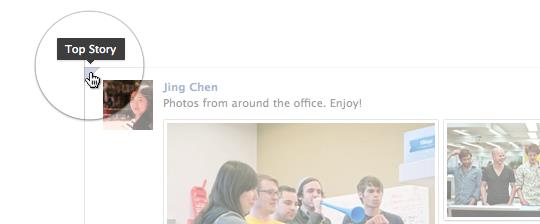
If you check Facebook more frequently, you’ll see the most recent stories first. Photos will also be bigger and easier to enjoy while you’re scrolling through.
- Hey look, photos just got a butt-load better too. Literally a butt-load. It’s a technical term.
2. Ticker becomes official
The ticker is a live-feed area that sticks to the upper right corner of the screen and gives you a running play-by-play of what is happening literally right now. Facebook has been playing around with the Ticker in various forms for a while now on a small scale, but now it is rolling out to everyone.
Click on anything in ticker to see the full story and chime in – without losing your place. Seeing it move in real time is a little distracting and more than a little creepy if you think about it too long. But we predict like all other Facebook changes people will hate it for two weeks, and then be unable to remember Facebook without it afterward.
- I be creepin’ on your Ticker, yo.

3. The Subscribe Button
The Subscribe button allows you to set just how much you want to hear from a person. In fact, Facebook will now allow you to subscribeto someone even if you’re not friends (or let others subscribe to you). The latter only works with posts set to public. You’re already getting your friends’ posts in News Feed. With the Subscribed button, you can choose how much you see from them:
- All updates: Everything your friend posts
- Most updates: The amount you’d normally see
- Important updates only: Just highlights, like a new job or move
You can also decide what types of updates you see. For example, you could see just photos from one friend, no stories about games from another, and nothing at all from someone else. You set it by visiting the person’t profile and hovering ove the Subscribe button.
- No one wants to admit that Facebook can figure this stuff out for us… but they totally can.
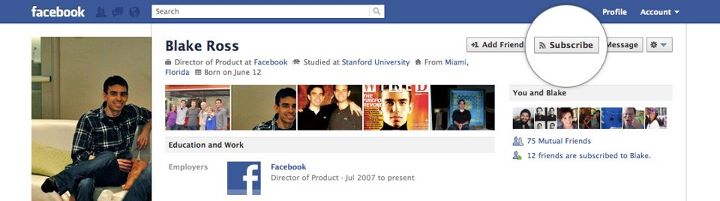
Don’t want to set each one of your friends individually? Well, by default, all of your friends have been set to “Most Updates” which covers the majority of what you’re interested in. You can then just reset the firends from whom you want All Posts or those from whom you want Only Important. You can also use…
4. The New Friend Button with Smart Lists
Now whenever you friend someone – or if you hover over the Friend Button on their profile – you have a few options you didn’t before. At the top of the list, you can easily set someone to “Close Friend” or only an “Acquaintance.” The former will automatically set their Subscription button to “All Posts” and the latter automatically sets it to “Only Important.”
- Don’t kid yourself, you are one smelly sock from moving to the acquaintance list.
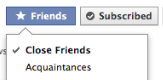
Also, Facebook has anticipated (correctly in my case) that the hardest part of Friends List (or Google+ Circles for that matter) is that you have to curate the lists. So now, you’ll see smart lists that create themselves and stay up-to-date based on profile info your friends have in common with you–like your work, school, family and city.
Facebook analyzes your work history, school, family and location to determine who will be added to your Smart List.
- Yes, I went to California State University, Fullerton. You want fries with that?
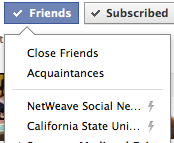
You will also see the Friend and Subscribe buttons also work from the user’s hovercard when you mouse over their profile pic or name.
5. “Profile” disappears
The old right-hand corner trifecta “Home,” “Profile” and “Account” have parted ways. Instead of Profile, you now have a small thumbnail and name of the user you’re logged in as – that should make things clearer when you are using Facebook as a Page. Also, the “Account” has been replaced by a simple down arrow so you can access all your account, privacy and logout settings.

- Yes, I know the ferret has more hair than I do.
6. Last but not least…
There are several smaller updates that are also rolling out:
- You no longer need 25 likes on a business page in order to grab a custom URL
- Facebook will try to not choke your inbox by emailing you a daily summary of the “less important” notifications instead of individual ones. If it makes you feel more alive to have a full inbox, you can change it back to individual emails on the notifications page .
- Posts or comments in another language prompt the appearance of a “translate” button.
- Posts that have been shared will now include a link you can follow to see who has shared them.
What is your most favorite update?
Kevin McNulty is co-founder and president of NetWeave Social Networking. NetWeave provides social media managed services for a wide range of clients in Tampa Bay and across the country, including the SUN ‘n FUN Expo and Fly In where their live social media coverage during and after an EF1 tornado was showcased by the Lakeland Ledger.
Kevin is active on most social media platforms and has been a guest lecturer for USF, Leadership Manatee, Leadership Lakeland, and the Tampa Bay International Society for Performance Improvement. Kevin received his degree in Psychology from California State University, Fullerton, served in the US Army, and worked for over 20 years in corporate training and communications.
Subscribe to:
Posts (Atom)


